Using the Zoho App: Adding expenses and submitting reports
2. Overview of different platform options (web, mac, android, iphone,ipad, etc) can be found here: https://www.zoho.com/us/expense/mobile- apps/#iphone-section
3. Enter an Expense: Please review the following video on how to manually enter an expense using the Zoho Expense app. https://youtu.be/iEjvWF5WjIE
4. Enter an Expense Automatically: Please review the following video on how to enter an expense (that was automatically pulled into the app from your credit card feed) using the Zoho Expense app. https://youtube.com/shorts/Nskz9HGPV3E
5. Email Receipts to Zoho App: Please review the following video on how to email a receipt to create an expense using the Zoho Expense app. https://youtu.be/sO0ewQ1OkHg
6. Expense Reports: Please review the following video on how to create and enter an expense report once your expense have been entered/allocated using the Zoho Expense
https://youtube.com/shorts/hrAp3g-_13w
Below is a generic video on Zoho Expense for IOS:
https://youtu.be/7cINap9fojE?si=G6P7PM2tiLMsDOTd
Below is a generic video on Zoho Expense for Android:
https://youtu.be/KEKZj3HEvgo?si=hZ59qflTZOTqsd9a
Any questions? Please reach out to JML@Lasorsa.com
Zoho Expense (Credit Card Expense Platform/App) Instructions
For AMEX Business Card
- Setup username and password for AMEX card (on AMEX site)
- Accept invite from Zoho
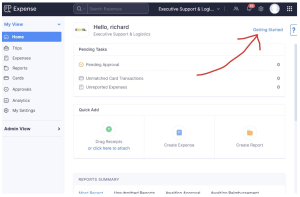
- Once you login to Zoho Expense (browser version) click on “Getting Started” link in top right hand corner of screen:
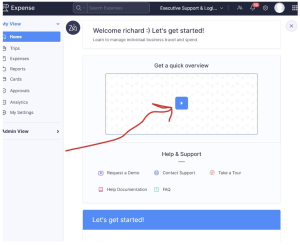
- On next screen click on video overview and watch. (Note: this is a powerful platform that has a lot of features/capabilities, many of which we will not be using at this time):
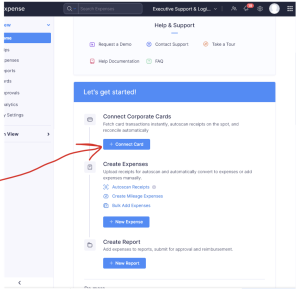
- After watching video. Connect your corporate card (AMEX) to Zoho expense. (using AMEX username/password you setup earlier):
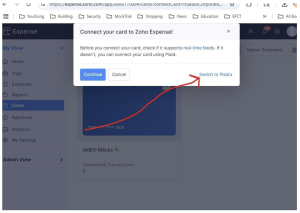
- Note: AMEX does not support real time feeds (VISA/MC do) so you will need to setup AMEX card through Click on “Switch to Plaid”:
- Once card is connected you are ready to use Zoho to allocate your credit card You can use the web/browser version and begin allocating your first expense/charge by clicking “+New Expense”. However, we recommend that you download the Zoho Expense app for IOS or Android and use that primarily. Also, you can send receipts to the platform via email. The location of your specific email address is shown below:


Contact Us
Initial consultations are always discreet, personal and free.
